


It’s 5:45 on a Tuesday. The kids are eating mac and cheese at the kitchen counter (we’re in that season, and I’m perfectly okay with it), someone is melting down about carrots touching their hummus, and the debate over who is doing bath time first is brewing.
We aren’t eating with the kids, because of exactly that sentence above. Plus there is no way we can get dinner on the table for all of us by then. Jason (my husband) and I eat after bedtime, just the two of us. I’m on-the-go as soon as my alarm goes off in the morning, and dinnertime is my one time all day to sit down and exhale.
But eating later means by the time we’re cooking, I am exhausted. I want something easy, with basically zero prep.
For years, this moment went one of two ways. Jason would open the fridge and throw something together (he is very good at playing everything-but-the-kitchen-sink, while I like an organized recipe). Or we’d stand there going back and forth on what-do-you-want-for-dinner until someone gave up.
Now dinner is already on both of our phones, with the recipe, ingredients and directions inside. I didn’t plan it on Sunday night like I used to. And I didn’t even have to remember to plan it.
Instinct messaged me on Friday at 3 PM, asked me three questions, and handled the rest.
I know this sounds over the top, but this meal planning setup has quite literally changed my life. It gives me back almost two hours a week (plus two fewer debates with Jason), and by the end of this post, you’ll have the exact prompt and AI setup behind it, ready to copy word for word.
If we haven’t met yet, hi! I spent 12 years in tech marketing before leaving my VP role three years ago, and now I’m building three businesses, including MNTSTUDIO, a Pilates brand we’ve grown from one location to soon-to-be seven across the Bay Area, and Roam Collective, a family summer abroad program. I also have a podcast, this newsletter and an active Instagram. Between all of this, two kids ages 4 and 6, and no au pair right now, AI runs a lot of my life.
But first, I have to tell you how I got here. Because the prompt I’m going to share is only half of why it works.
The Sunday Seven
Rewind to 2024. Meal planning was step four of my Sunday Seven, the Sunday ritual I swore by to make both work and life a little more manageable that week. Meal planning, priorities, childcare, the social calendar and a sync with Jason were all part of it.
The whole point was a little buffer, so I didn’t start Monday feeling frantic. (I’ve since handed all seven steps to AI, but that’s another post.)
My template even had a “Who is cooking” column, because that’s been a debate in our house for years.
So every Sunday, I’d scroll through the recipes I’d saved on Instagram, click through my favorite food bloggers’ sites and try to figure out what sounded good.
And it worked, kind of. That plan carried us through about half the week. By Thursday we were eating the kids’ leftover chicken nuggets on top of a salad and calling it dinner.
We both love to cook. What wore me out was all the thinking around it:
Which nights are we actually home?
Which nights are leftovers?
Who’s getting home too late to cook, so we need something batched ahead?
What needs using up in the fridge?
What did I already order?
What are we even in the mood for?
How long will it take to clean up?
That list lived in my head like a browser tab I could never close.
The first prompt
Two summers ago, I shared my meal-planning prompt in my ChatGPT prompt of the week series on Instagram. And it was great!
I told it what I’d picked up at the farmers market that weekend and a few blogs I loved, and asked for a meal plan built around both. It worked, and the Sunday scroll was gone.
I was hooked. But that was one step.
Eve Rodsky makes this point so well in Fair Play: a task is never just the doing. It’s all the planning, remembering and follow-through that goes into it (hence my list above).
Meal planning has a looong list like that. And I wanted every item off my plate.
So I kept going. Every time something wasn’t quite right, I added a rule:
Four servings per recipe, so dinner becomes our lunch the next day.
Flavorful, never spicy.
Only recipes from the sites I actually like to cook from.
One grocery list, added up and sorted by grocery aisle.
It got better every week. And every week, I was still the one who had to sit down and start it.
Why I kept rewriting it
Yes, I’m a constant optimizer. But also yes, the tools kept getting better.
At first, AI could only answer what I asked. Then it could remember things about me. Then it could look at my calendar and read my email. And then it could do the thing that changed everything: it could start the conversation without me thinking about it.
Every time it learned to do something new, I realized my prompt was holding it back. I was still treating it like a Google search bar when it could act more like a proactive executive assistant.
A solid prompt you have to remember to run is still on your to-do list. Even a scheduled reminder that pings you to paste the prompt again leaves you holding all the context.
So I rebuilt it around one goal: I wanted to never have to think about starting a meal plan again.
Every upgrade let me chip away at one more item on that long list, until the tab in my head finally closed.
What Friday looks like now
Every Friday at 3 PM my phone buzzes. It’s Instinct, and it’s messaging me first. (Instinct is just where I happen to run this. More on why, and how it works in ChatGPT, Claude or Littlebird, below.)
By the time it pings me, Instinct has already looked at the next seven days on my calendar. It knows Wednesday is dinner with friends, so it skips it.
It sees Thursday is blocked as OPEN FOR DINNER, my flag for a night we might host friends at our place or book a sitter for date night. So it asks what the plan is before it puts a regular dinner there.
Then it asks me two more things: what needs using up, and what I’m craving.
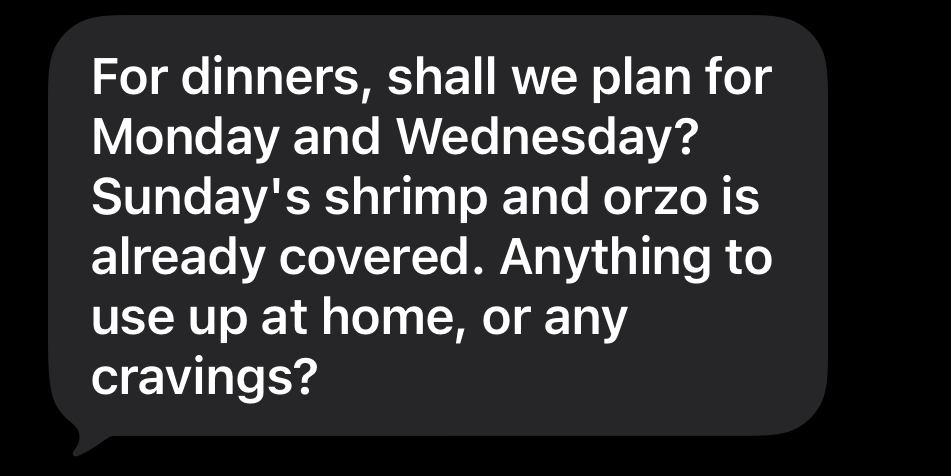
I answer in about ten seconds, maybe grabbing a link to a reel I just saw on Instagram that looks good. It comes back with a menu from my favorite sites and waits for my OK.
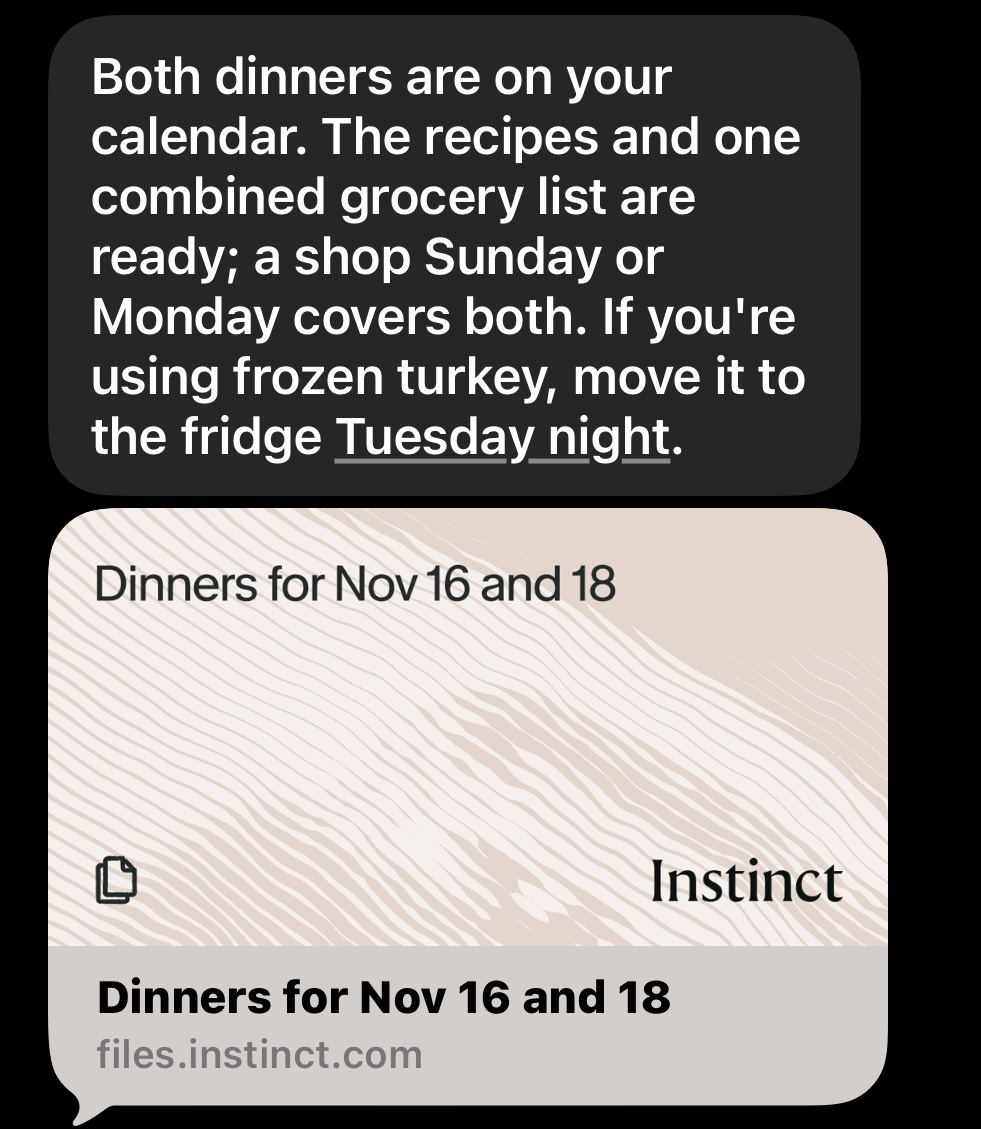
Once I approve, it gives me one combined grocery list and maps out my Sunday prep. It even reminds me the night before when something needs to come out of the freezer, like the ground turkey for tomorrow’s dinner.
Then it puts every dinner on our Meals & Housework calendar, with the recipe link, ingredients and directions right inside the event.
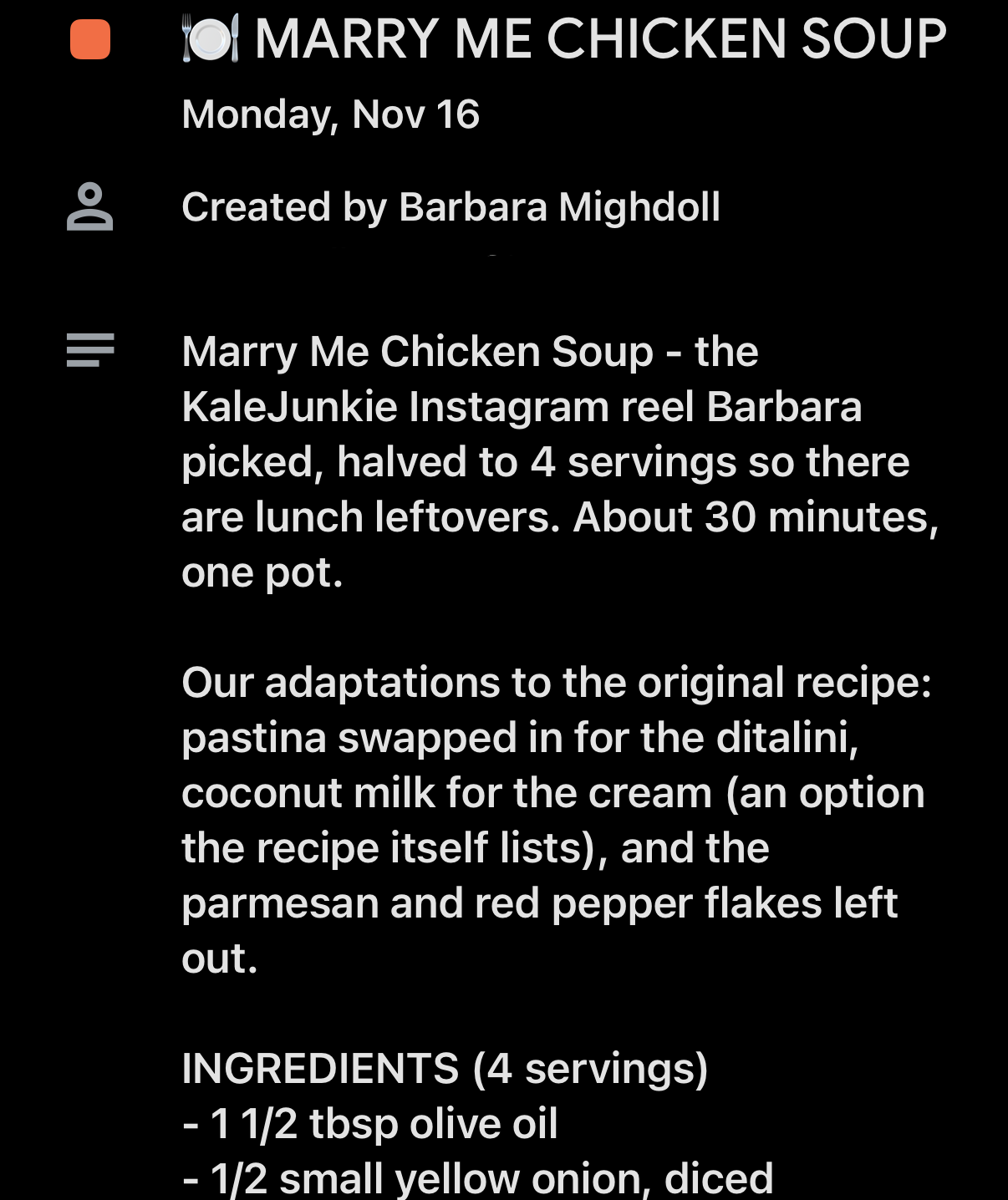
Remember that “Who is cooking” column? Who cooks in our house depends on which kid wants which parent for bath and bedtime that night, so we’re constantly tagging in and out.
Now I just tell Jason to open his calendar. No more stopping what I’m doing to pull up the recipe on my laptop for him. He fully owns dinner on his nights.
My before and after:
Remembering to meal plan at all. Before: me, every Sunday. Now: Instinct messages me every Friday
Figuring out which nights we’re home. Before: me, cross-checking calendars. Now: Instinct reads my calendars.
Deciding what sounds good. Before: me, scrolling saved posts and blogs. Now: Instinct proposes, I approve.
Making the grocery list. Before: me, adding up ingredients across recipes. Now: one combined list, sorted by grocery aisle.
Remembering to thaw the ground turkey. Before: me, usually remembering at dinnertime (too late). Now: a reminder the night before.
Getting Jason the recipe. Before: me, pulling it up on my laptop. Now: it’s on his calendar.
If you just copy my prompt, though, you’ll miss the big part that actually makes all those tabs in your mind fully close.
The prompt is only half of it
I am sooo proud of this prompt. I’ve been refining it for over a year, and I can honestly say it’s perfected.
But if you paste it into a blank chat, you’ll get a decent meal plan for exactly one week. The AI tools you use can only plan around what they can see.
The reason mine feels effortless is the systems underneath it. And you can set up every one of them.
Most of us are still using AI one prompt at a time. Once it’s plugged into how your week actually runs, it starts carrying real weight.
1. Everything goes on a calendar.
I run several calendars, and Instinct reads all of them:
School for the kids’ school schedule.
Childcare for appointments, activities, babysitters, and who’s doing which drop-off and pickup.
BUSY BUSY LIFE, Jason’s and my joint calendar, for important events, date nights, holidays, family get-togethers and travel.
Meals & Housework, where every dinner lands.
Work calendars for each of my businesses.
Every day also has an all-day entry, marked free, that says where I’ll be: working from home, or which studio I’m popping into.
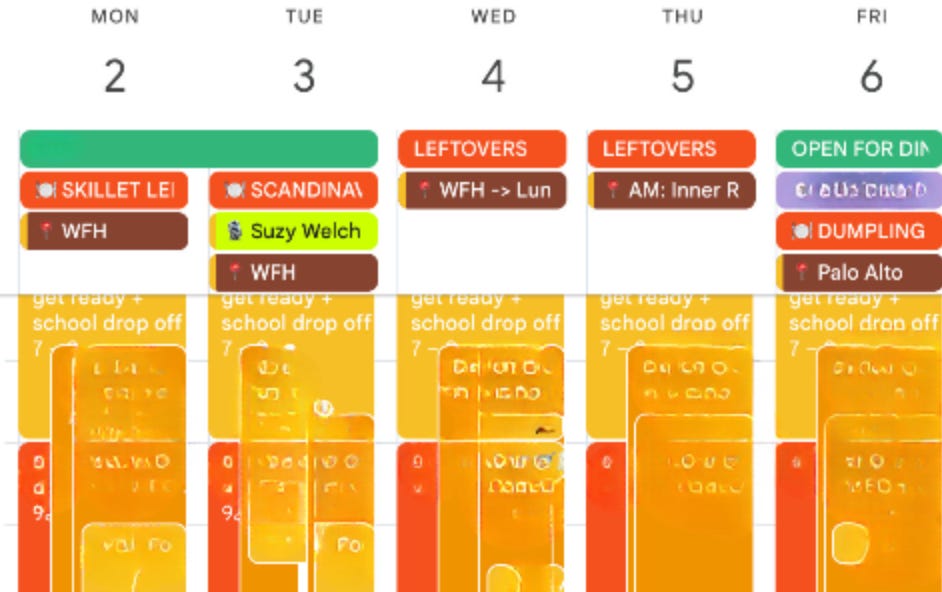
So take a look at yours. Does it show which days you’re in the office, working from home, or both? Is your commute on there? Your partner’s late nights? Dinner plans with friends? If it’s not on your calendar, Instinct (or whatever AI you’re using) can’t plan around it.
2. Your taste gets written down once.
Approved recipe sites only (I’m linking every one of my go-to sites and resources with the prompt below). A few of my rules: flavorful, never spicy. No protein repeats in a week except chicken, ground chicken or ground turkey. No lactose, so sub in coconut milk, pecorino or non-dairy yogurt.
3. Lunches are part of the plan.
I gave it my rules for lunches too. Every dinner makes four servings, so Jason and I have leftovers the next day.
Same goes for the kids’ school lunches. Our au pair usually packs those, and while we’re between au pairs, my house manager has picked up a few extra hours a week to help.
And since we don’t eat dinner with our kids right now, my personal plan is for two adults. If your family eats together, this works exactly the same way. You just tell it who’s eating, what the constraints and preferences are and that’s built right into the prompt.
4. The grocery list matches how I shop.
I build my Costco cart myself. Once that order is in, Instinct checks it against the menu and gives me one list of whatever’s left, sorted by aisle, so I decide where the rest gets bought. We usually pop into Whole Foods once a week to grab the little extras.
5. Every correction gets saved as a permanent preference.
This is the step almost everyone skips. When something’s off, don’t just fix this week. Tell it to save that correction as a permanent preference.
Otherwise you’re starting from scratch every week and getting frustrated. And this goes for meal planning and literally anything else you use AI for.
6. Nothing gets calendared until I approve.
Instinct drafts the menu, and I approve it before anything lands on our calendar. I like seeing the week before it’s locked in.
What it still can’t do
Last month I spoke on a panel at a vibe coding event I co-hosted with Kylee Hayden of Women + AI. One of the questions was what you don’t let AI do.
My answer was graphic design… or anything that requires discernment of style (that’s a whole other post). But I also don’t think it can do the groceries, at least not yet. And yes I know, I see the same posts as you saying people are having it connect to Instacart, but that still requires a human review.
Technically, could I have it log into my Costco account and add last week’s order to my cart because I order the same exact thing almost weekly? Yes. And now that I’m typing this out, I probably should lol.
What it can’t do is open my fridge and see that we still have 18 eggs and a full gallon of cold brew. Or check the pantry and notice the box of Goodles nobody has touched yet.
So until there’s a camera in my fridge and pantry, I’m not handing over the reins on placing the order. But… maybe I’ll let it start the cart.
Which brings me to an important question you likely have: how does everything even get on your calendar?
How everything gets on my calendar
This whole system only works because my calendar is complete. And TBH, keeping it complete is a job in itself.
Enter Littlebird
First, a huge thank you to Hitha Palepu for introducing me to Littlebird during our podcast episode.

Littlebird is what keeps my calendar complete. It reads all my Gmail accounts, my calendars and my Slack channels, and it records my meetings (it fully replaced Granola for me). Then it puts plans on my calendar and to-dos in Notion without me copying a thing.
Could Littlebird run this whole meal plan too? 100%. I run it in Instinct because I love testing new platforms, and meal planning is the perfect low stakes, apples-to-apples test (Muse is next).
I’m writing a full post on exactly how I set up Littlebird, so tell me in the comments what you want covered. And if you want to start now, use my link to get two full months of Littlebird free.
Get the prompt
Think about everything that just came off my plate. The endless scrolling on Instagram for food inspo, the thousand recipe tabs open on your desktop, the grocery list math, the dinnertime panic over whether anyone took the turkey out.
For me, that adds up to this every week:
About 35 minutes of meal planning
About 15 minutes off ordering groceries (I still place the order, it just goes way faster)
About an hour of last-minute store runs for the one ingredient I forgot
Two debates over who’s cooking and what to even make
Waaay fewer leftover chicken nugget dinners
That’s almost two hours back every week, plus two fewer debates.
And the bigger win for me is the headspace. I don’t think about meal planning anymore. Instinct pings me at 3 PM on Friday, and ten minutes later the whole week is done.
That Monday buffer I used to build by hand every Sunday night is now ready for me on Friday afternoon.
I said it at the top and I’ll say it again: this has changed my life. And you can implement it in just 10 minutes today.
Everything below the paywall, ready to copy:
My full, perfected prompt, with brackets for your household (including how to plan for a family that eats together)
All my go-to recipe sites and resources, linked
The scheduling prompt that makes whatever platform you are using message you first, every single week
The save-it-forever correction that stops you from ever starting over
A week-one check-in prompt that makes it smarter about your taste every week
A troubleshooting guide for the most common hiccups
Setup steps for ChatGPT, Claude, Littlebird and Instinct, plus a workaround if your app can’t schedule
So keep reading, set it up today, and next Friday at 3 PM, you’ll get your first ping.